DTF gang sheets: how to cut film waste
How to nest several graphics on the same sheet of film, what spacing to leave and how to work out what each print really costs you.
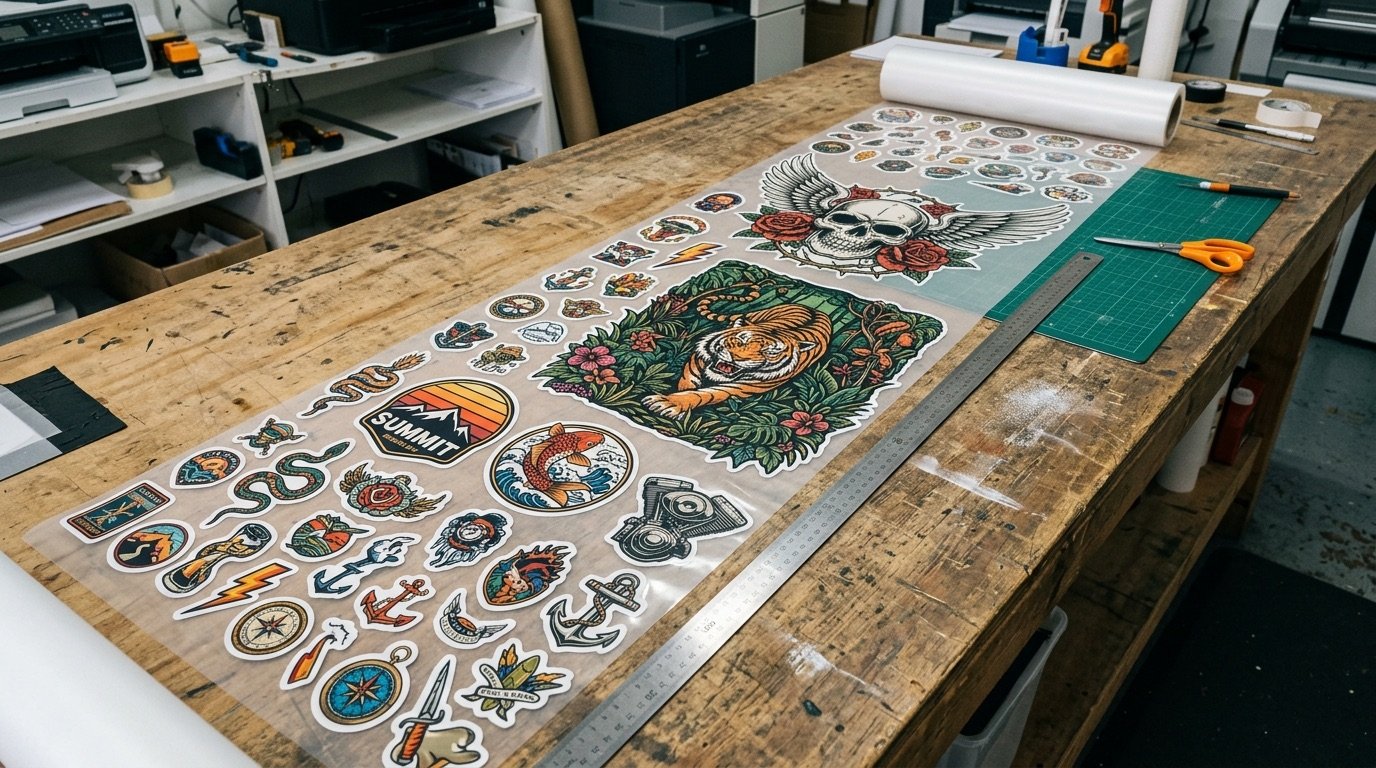
In DTF you pay for film, not for graphics. Every empty centimetre on the sheet is money printed on nothing. The gang sheet is the simplest way to bring down the cost of each print, provided you lay it out well.
This guide covers what a DTF gang sheet is, how to arrange artwork to cut waste, the mistakes to avoid and how to work out what each transfer really costs you.
- A gang sheet groups several graphics onto one sheet of film.
- Leave 5–10 mm between one graphic and the next for cutting.
- Fill the gaps with small logos, labels and sleeve prints.
- Real cost per print = cost of the sheet ÷ number of graphics.
What a DTF gang sheet is
A gang sheet is a sheet (or length of roll) of DTF film with several graphics laid out together, even different ones for different customers. Everything is printed in one pass, powdered, cured, and then the individual transfers are cut out.
DTF print shops typically sell film by the linear metre or by fixed-size sheet (A3, for instance, or rolls around 30 or 60 cm wide). For you that means one thing: the more graphics you fit into the same space, the less each print costs.
How to work out the real cost of a print
The maths is simple: cost of the sheet ÷ number of usable graphics. Here is an example with indicative figures, one linear metre of 58 cm film at €20:
| Layout | Graphics per metre | Cost per graphic |
|---|---|---|
| 28 cm fronts only, one per row | 3 | ≈ €6.67 |
| 28 cm fronts, two side by side | 6 | ≈ €3.33 |
| As above + 9 cm logos in the gaps | 6 + 10 | ≈ €1.25 (average) |
Same metre, same price, cost per piece divided by five. This is where much of the margin on a DTF order is decided, before anything is printed.
How to arrange artwork to cut waste
1. Start with the largest graphics
Place fronts and backs first, since they set the structure of the sheet. Put them side by side when the roll width allows: two 28 cm graphics on a 58 cm roll use the space far better than a single centred one.
2. Rotate where it helps
A portrait graphic rotated 90° can slot perfectly next to another. It makes no difference in print: orientation only matters when you press the transfer.
3. Fill the gaps with small formats
Chest logos, sleeve prints, neck labels, patches: perfect for occupying the space left between the big graphics. If you have no small orders queued, use them for test prints or for your own stock.
4. Respect spacing and margins
- 5–10 mm between graphics, so you can cut without damaging the edges;
- a small margin from the film edges, as your print shop specifies;
- no overlaps, not even of "dirty" transparent pixels.
The mistakes that waste film
- Uncropped canvases: a PNG with 3 cm of transparency around it takes up space you cannot see. Always crop to the artwork.
- One centred graphic per row: easy to lay out, expensive to print.
- Different resolutions on the same sheet: the gang sheet is exported at 300 DPI and every graphic has to be 300 DPI at its real size.
- Unoptimised files: semi-transparent pixels and solid black backgrounds get multiplied by every graphic on the sheet. Before you nest anything, prepare each file as explained in how to prepare a file for DTF printing.
PNG or PDF for the gang sheet?
Both formats work when exported at 300 DPI with clean transparency. PNG is the most common standard; PDF is handy for very long sheets and is handled well by several professional RIPs, such as Mimaki RasterLink. The best rule is still to ask your print shop which format they prefer, and then stick to it.
Automatic nesting
Building a gang sheet in Photoshop means creating the canvas, dragging graphics in one by one, rotating them, aligning them and checking spacing by hand: a full sheet can take more than half an hour. With Gang Sheet Studio you set the sheet dimensions, load your designs, and they are nested automatically to optimise the space, with PNG or PDF export at 300 DPI ready for the RIP.
It comes with the Halftonix Pro + Gang Sheet Studio bundle, in a single lifetime licence: prepare each file with clean halftones and transparency, then nest it onto the sheet in a minute.
Frequently asked questions
What is a DTF gang sheet?
It is a single sheet (or length of roll) of DTF film with several different graphics laid out together. You print once, cut the transfers out and press each one onto its garment, paying for film by the metre or by the sheet rather than per print.
How much space should I leave between graphics on a gang sheet?
As a reference, leave roughly 5–10 mm between one graphic and the next: enough to cut comfortably with scissors or a trimmer without touching the print. Check your print shop's own guidance as well.
PNG or PDF for a gang sheet?
Both work if they are 300 DPI with clean transparency. PNG is the most widely used; PDF is handy for very long sheets and for some RIPs, such as Mimaki RasterLink. Ask your print shop which they prefer.
How do I work out the cost of a print on a gang sheet?
Divide the cost of the sheet (or metre of film) by the number of prints it holds. For example, a metre at €20 holding 16 logos of 10 cm puts each logo at €1.25. The fuller the sheet, the lower the unit cost.